
On this page
On this page
Add a coordinator to Home Assistant with ZHA
ZHA is Home Assistant's built-in Zigbee integration — no separate Zigbee2MQTT process.
Inswift USB Silabs sticks (ZBT-1P, ZBM-MG21, ZBM-MG24) usually work out of the box; the setup flow often finds the serial device automatically. Ethernet gateways (ETH-52P / ETH-52P7, ETH-MG21 / ETH-MG24, including PoE) connect over the network with a socket URL. Do not run ZHA and Zigbee2MQTT on the same coordinator at once.
Zigbee2MQTT uses tcp://…:6638, not socket://. See Zigbee2MQTT with an Inswift coordinator.
Quick reference
| Product | Chip | How to connect in ZHA |
|---|---|---|
| ZBT-1P, ZBM-MG21, ZBM-MG24 | EFR32MG21 / EFR32MG24 | USB serial (prefer by-id) |
| ETH-52P / ETH-52P7 | TI CC2652P / TI CC2652P7 | socket://dongle.local:6638 or socket://GATEWAY_IP:6638 |
| ETH-MG21 / ETH-MG24 (including PoE) | EFR32MG21 / EFR32MG24 | Same socket defaults |
- Default Zigbee port on ETH gateways: 6638
- Default mDNS hostname:
dongle.local
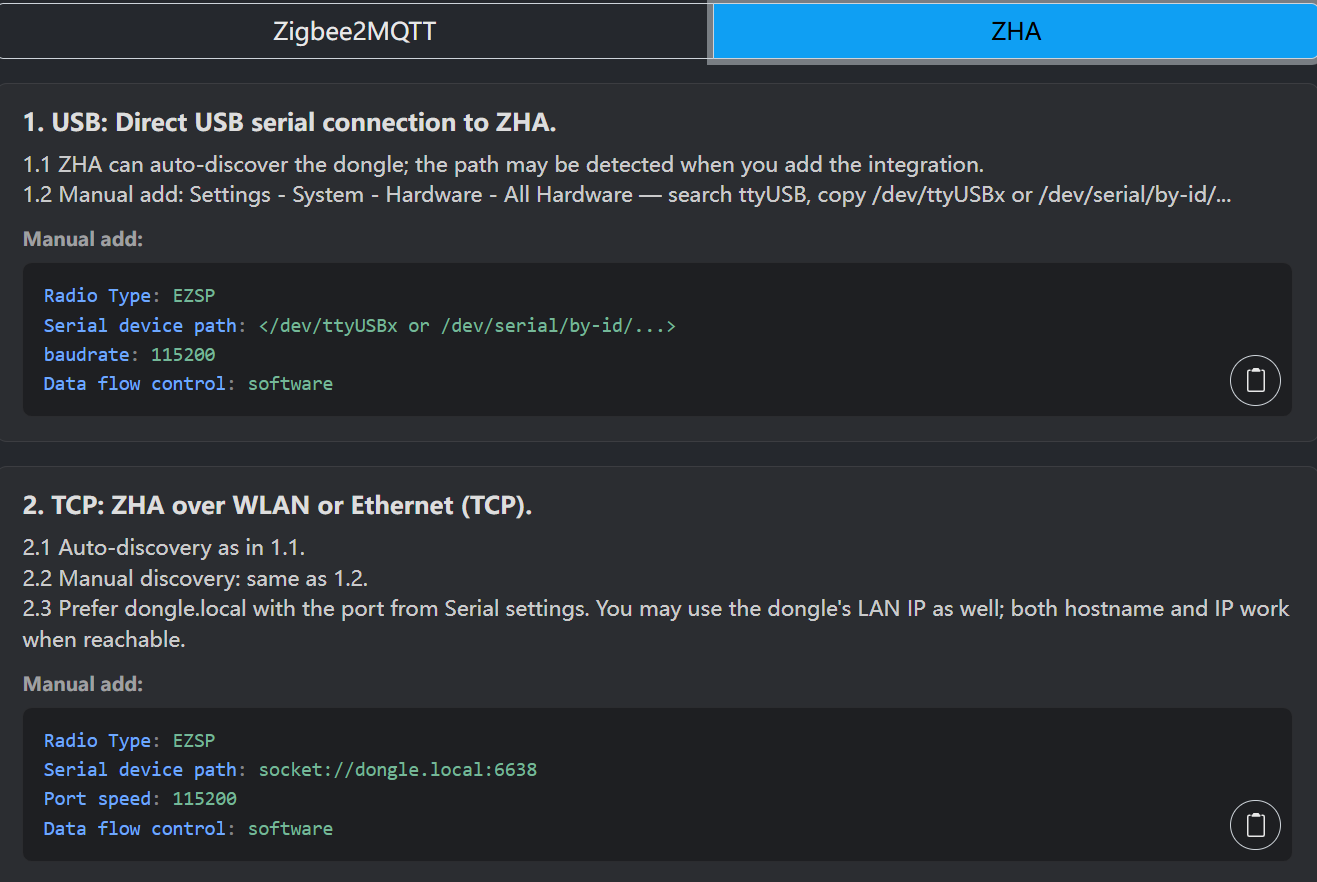
The gateway web UI can copy USB or TCP snippets. The screenshot is the ZHA page on an ETH gateway (Silabs example, Radio Type EZSP; TI in ZHA uses ZNP / zstack).
Prepare (USB)
- Plug the coordinator into the Home Assistant host with a USB extension (avoid USB 3.0 ports when you can). See Placement and interference
- Confirm the OS sees a serial device. Prefer by-id: Home Assistant → Settings → System → Hardware, or on the host
ls -l /dev/serial/by-id/ - Paths like
/dev/ttyUSB0//dev/ttyACM0work but can change after reboot - Close anything else using that serial port. Do not run Zigbee2MQTT against the same dongle
Windows / macOS hosts need the matching USB serial driver (CP210x / CH9102) — see Flash USB dongle firmware.
Prepare (Ethernet / Wi-Fi)
- Power the gateway and connect it to the same LAN as Home Assistant (Ethernet preferred; Wi-Fi is fine if stable)
- Open the gateway web UI:
http://dongle.local/orhttp://GATEWAY_IP/ - Confirm the Zigbee radio is in coordinator firmware, not Zigbee router. Router mode only extends the mesh and will not appear as a ZHA coordinator
- Default Zigbee bridge port: 6638
If dongle.local does not resolve (Docker, VLAN, or networks that block multicast DNS), use the LAN IP. A DHCP reservation helps.
Add the integration — USB
- Settings → Devices & services → Add integration → search ZHA
- Choose the serial port (prefer the by-id entry)
- Leave baud rate at the default unless your firmware notes say otherwise
- Finish the wizard, open the integration, use Add device, then put end devices into pairing mode
Add the integration — Ethernet / Wi-Fi
- Settings → Devices & services → Add integration → search ZHA
- When asked for the serial / radio path, choose network / socket (wording varies by Home Assistant version). Do not pick a local
/dev/tty…device - Enter one of:
socket://dongle.local:6638or, if mDNS fails, the gateway LAN IP:
socket://GATEWAY_IP:6638- Complete the wizard. A steady green link LED on the gateway usually means the host is connected to the radio bridge
- Open the integration → Add device, then put end devices into pairing mode
ETH-52P / ETH-52P7 and ETH-MG / PoE use the same socket form in ZHA: socket://dongle.local:6638.
Router firmware vs coordinator
On ETH-MG21 / MG24 (and PoE) running Zigbee router firmware:
- ZHA will not use that unit as the network coordinator
- Debug from Logs & Debug in the device web UI — see ETH-MG router web CLI
- The web CLI is separate from Zigbee port 6638 used when the unit runs as a coordinator
Common issues
| Symptom | What to check |
|---|---|
| No serial port listed | Driver (Win/macOS), USB cable/port; Hardware → by-id |
| Network setup fails / timeout | Same LAN as HA; port 6638; try IP instead of dongle.local; web UI reachable |
| Already configured / radio in use | Stop Zigbee2MQTT or another ZHA instance using the same coordinator |
| ZHA “delete and recreate” fails | See FAQ (zigbee.db cleanup — back up first) |
| Devices won't join | Allow join in ZHA; end device in pairing; placement / interference |
Related: Zigbee2MQTT with an Inswift coordinator · FAQ · Flash USB dongle firmware · Flash ETH host over USB · ETH-52P / ETH-52P7 web local upgrade ESP32 / Zigbee · ETH-52P / ETH-52P7 change IEEE (coordinator migration) · ETH-MG web change IEEE (coordinator migration) · Placement and interference