
On this page
On this page
- Find by error
- 1. Zigbee2MQTT serial settings
- 2. ZHA and Zigbee2MQTT on the same coordinator
- 3. MQTT and Zigbee2MQTT can run together
- 4. Only one Zigbee2MQTT on a Home Assistant host
- 5. Ping timeout after firmware or config change
- 6. Z2M will not start after switching from TI to Silabs
- 7. ezsp vs ember for Silabs firmware
- 8. Turn the LED off on TI CC2652P / CC2652P7 open-source stacks
- 9. Placement, USB extension, and 2.4 GHz interference
- 10. Network coordinator won’t reconnect after outage
- 11. Migrating to a new coordinator
- 12. Router firmware vs coordinator
- 13. ZHA delete-and-recreate fails
- 14. Z2M cannot find fullchain.pem
- 15. First-time Z2M: serial first
- 16. Z2M web UI will not open
- 17. Yes / no
FAQ
These are common issues when bringing an Inswift USB Zigbee dongle or Ethernet Zigbee dongle into Home Assistant. USB models: ZBT-1P, ZBM-MG21, ZBM-MG24. ETH models: ETH-52P / ETH-52P7, ETH-MG21 / ETH-MG24, and PoE.
ETH defaults: Zigbee port 6638, mDNS dongle.local. Zigbee2MQTT uses tcp://; ZHA uses socket://.
Find by error
| If you see… | Go to |
|---|---|
| ZHA offered automatically / both stacks fail | 2. ZHA and Zigbee2MQTT on the same coordinator |
SRSP - SYS - ping after 6000ms / Ember HOST_FATAL_ERROR | 5. Ping timeout after firmware or config change |
| Drops near USB 3 / SSD / Wi-Fi AP | 9. Placement, USB extension, and 2.4 GHz interference |
| Works until router reboot (Ethernet) | 10. Network coordinator won’t reconnect after outage |
| After swapping a dongle, devices stay offline | 11. Migrating to a new coordinator |
| Flashed router but Ethernet does not extend the mesh | 12. Router firmware vs coordinator |
Full setup: Zigbee2MQTT with an Inswift coordinator · Add a coordinator with ZHA.
1. Zigbee2MQTT serial settings
serial needs the right port, adapter, and (for USB) baud rate. Use your own Mosquitto username and password.
SKU → adapter → port
| Product | adapter | Port |
|---|---|---|
| ETH-52P / ETH-52P7 | zstack | tcp://dongle.local:6638 or tcp://GATEWAY_IP:6638 |
| ETH-MG21 / ETH-MG24 (including PoE) | see ember / ezsp below | same TCP defaults |
| ZBT-1P, ZBM-MG21, ZBM-MG24 | see ember / ezsp below | /dev/serial/by-id/... |
If dongle.local does not resolve, use the LAN IP. On Home Assistant add-ons using a remote TCP adapter, set socat.enabled: false. Prefer by-id over /dev/ttyUSB0 or /dev/ttyACM0. ZHA on the network is socket://dongle.local:6638 — do not paste tcp:// into ZHA.
Copy-paste: ETH TI (52P / 52P7)
mqtt:
  base_topic: zigbee2mqtt
  server: mqtt://homeassistant.local:1883
  user: YOUR_MQTT_USER
  password: YOUR_MQTT_PASSWORD
serial:
  port: tcp://dongle.local:6638
  # port: tcp://GATEWAY_IP:6638
  adapter: zstack
socat:
  enabled: false
Copy-paste: ETH Silabs (MG21 / MG24 / PoE)
mqtt:
  base_topic: zigbee2mqtt
  server: mqtt://homeassistant.local:1883
  user: YOUR_MQTT_USER
  password: YOUR_MQTT_PASSWORD
serial:
  port: tcp://dongle.local:6638
  # port: tcp://GATEWAY_IP:6638
  adapter: ember
socat:
  enabled: false
Copy-paste: USB Silabs
mqtt:
  base_topic: zigbee2mqtt
  server: mqtt://homeassistant.local:1883
  user: YOUR_MQTT_USER
  password: YOUR_MQTT_PASSWORD
serial:
  port: /dev/serial/by-id/usb-XXXX_YYYY-if00-port0
  baudrate: 115200
  adapter: ember
USB Silabs coordinator / router / Multi-PAN is commonly 115200; Thread firmware is commonly 460800. After a flash, do not keep the old baud rate. Check the gateway web UI or firmware notes.
Docs: Zigbee2MQTT adapter settings · EmberZNet (Silabs) · Z-Stack (TI)
2. ZHA and Zigbee2MQTT on the same coordinator
Symptom: Zigbee2MQTT will not start, ZHA fails intermittently, or Home Assistant offers ZHA as soon as it sees the adapter.
Cause: Only one stack may own a coordinator (one USB dongle or one ETH gateway) at a time.
Steps:
- Pick ZHA or Zigbee2MQTT for this device
- If Home Assistant offered Zigbee Home Automation, remove or disable that ZHA instance before starting Zigbee2MQTT (or the reverse)
- Restart the remaining stack and confirm a single client holds the serial port or
dongle.local:6638 - Keep Mosquitto running if you use Zigbee2MQTT. MQTT and Z2M are meant to run together
Two coordinators can run the two stacks separately (for example USB on ZHA and ETH on Z2M). That is two Zigbee networks.
Docs: Zigbee2MQTT FAQ: coordinator cannot be used by another application · Home Assistant ZHA limitations
3. MQTT and Zigbee2MQTT can run together
Mosquitto (MQTT) and Zigbee2MQTT are meant to run at the same time. MQTT is the broker; Z2M talks to the dongle. “Only one Z2M” does not mean you should stop MQTT.
Docs: Zigbee2MQTT MQTT configuration
4. Only one Zigbee2MQTT on a Home Assistant host
Keep a single Zigbee2MQTT instance. If an older Z2M was installed under MQTT-related add-ons, remove it before installing the one you will use.
5. Ping timeout after firmware or config change
Symptom: Log shows SRSP - SYS - ping after 6000ms, Ember HOST_FATAL_ERROR, or “socket connected” then immediate protocol failure — especially after a firmware update.
Cause: adapter, baud rate, and port do not match the firmware / web UI Serial settings, or another client still holds the radio.
Steps:
- Match adapter to the chip: ETH-52P / ETH-52P7 (TI CC2652P / TI CC2652P7) →
zstack; ZBT-1P, ZBM-MG21 / MG24, ETH-MG21 / MG24 (EFR32) →emberorezsp(see the next section) - Match baud rate to the firmware and ETH web UI. USB coordinators commonly use 115200; Thread firmware commonly uses 460800. Do not keep the old value after a flash
- Match port: USB by-id; Z2M network
tcp://dongle.local:6638(socat.enabled: falseon the add-on); ZHAsocket://dongle.local:6638 - Close a second Z2M, ZHA, or serial monitor
- If you just swapped TI ↔ Silabs, fix the old backup in the next section
ETH-52P / ETH-52P7 can upgrade ESP32 and CC2652 from the gateway web UI. See ETH-52P / ETH-52P7 web local upgrade ESP32 / Zigbee.
Docs: Zigbee2MQTT: SRSP ping / HOST_FATAL_ERROR
6. Z2M will not start after switching from TI to Silabs
If you used TI first (ETH-52P / 52P7) and then switched to Silabs (ZBM / ZBT-1P / ETH-MG), Zigbee2MQTT may still have an old coordinator backup. Switching to ezsp / ember then fails; logs may show SRSP - SYS - ping after 6000ms.
- Set adapter to match the dongle you plugged in
- Delete the old coordinator backup in the Zigbee2MQTT data folder, or remove and reinstall the add-on
- Restart Zigbee2MQTT

Docs: Zigbee2MQTT FAQ: migrate adapters
7. ezsp vs ember for Silabs firmware
For Silabs coordinators, adapter depends on Zigbee2MQTT version and NCP firmware (EZSP protocol):
| When | Use |
|---|---|
| Z2M 1.35 and older | ezsp |
| Z2M 1.36.0 and later (including 2.x) | prefer ember |
| Firmware EmberZNet 7.4.x or newer (EZSP v13+, including 8.x / 9.x) | ember |
| Firmware EmberZNet before 7.4 (EZSP v12 and below) | ezsp |
ember landed in Z2M 1.36.0 and is now the official recommendation. ezsp is deprecated and kept for old firmware.
If you see Adapter EZSP protocol version (12) is not supported by Host 13-16, Z2M is on ember but the firmware is still EZSP v12. Upgrade the coordinator firmware to 7.4 or newer, or temporarily switch back to ezsp.
Flashing: USB dongles use Flash USB dongle firmware; ETH-52P / ETH-52P7 web upgrade of host and Zigbee uses ETH-52P / ETH-52P7 web local upgrade ESP32 / Zigbee; if the UI is gone, flash the ETH host over USB with Flash ETH dongle firmware.
Docs: EmberZNet: adapter configuration (ezsp deprecated) · EZSP version mismatch · GitHub: ember replaces ezsp
8. Turn the LED off on TI CC2652P / CC2652P7 open-source stacks
When flashing a TI CC2652P / CC2652P7 (ETH-52P / ETH-52P7) with an open-source stack, turn the LED off so it does not interfere with the serial link. In Zigbee2MQTT you can set serial.disable_led: true.
Docs: Z-Stack: disable_led · disable_led in adapter settings
9. Placement, USB extension, and 2.4 GHz interference
Symptom: Weak join success, random drops, MAC channel access failure, or devices near the coordinator behave worse than devices farther away.
Cause: USB 3 / SSD / dense 2.4 GHz noise, a short stick against the host, overlapping Wi-Fi channel, or TX power set too high.
Steps:
- Place the coordinator as centrally as practical; keep antennas vertical when possible
- USB dongle: use a USB 2.0 extension (≥ 0.5–1 m; 1–2 m is better); avoid USB 3 ports and SSDs. See Placement and interference
- Keep about 1 m from Wi-Fi APs, microwave ovens, and other 2.4 GHz noise
- Prefer Zigbee channels that avoid your busy Wi-Fi (community common picks: 15 / 20 / 25 — match your AP’s plan)
- Do not leave transmit power at absolute maximum by default — too high TX can make distant devices hear the coordinator and fail to reply
Ethernet / PoE gateways still need RF placement; moving the box out of the rack often helps more than a faster chip. For larger homes prefer an ETH gateway on Ethernet, plus always-on Zigbee routers (bulbs, outlets).
Docs: Zigbee2MQTT: USB extension · Avoid Wi-Fi channel overlap · Home Assistant ZHA: interference
10. Network coordinator won’t reconnect after outage
Symptom: The ETH / PoE / Wi-Fi gateway worked, then after a router reboot or power cut Zigbee2MQTT stays down until you restart the add-on.
Cause: The TCP session to the radio bridge (port 6638) may not reopen automatically when the gateway returns.
Steps:
- Prefer a DHCP reservation (or static IP). If
dongle.localis flaky after outages, usetcp://GATEWAY_IP:6638/socket://GATEWAY_IP:6638 - In Zigbee2MQTT, enable the watchdog so the process recovers when the adapter path fails. See Zigbee2MQTT watchdog
- Optional Home Assistant automation: wait until the gateway IP responds to ping, then restart the Zigbee2MQTT add-on
- Confirm
http://dongle.local/or the gateway IP web UI is reachable before blaming Zigbee pairing
Docs: Zigbee2MQTT: network adapter stability
11. Migrating to a new coordinator
Symptom: After swapping an Inswift dongle or gateway, devices stay offline, commissioning times out, or logs mention stateChangeInd / pan ID conflicts.
Cause: The old coordinator or routers still advertising the same network, or a backup from a different stack (TI zstack ↔ Silabs Ember) was restored.
Steps:
- Stop the old coordinator (power it down — do not leave it on USB or the LAN)
- Power-cycle Zigbee routers for ≥ 15 seconds (a whole-house cut is common when many mains-powered routers exist)
- Restore a backup that matches the same chip family when possible (TI to TI, Silabs to Silabs)
- Cross-chip moves (TI ↔ Silabs): remove incompatible
coordinator_backup.json(or reinstall the add-on) and expect re-pair — do not force a zstack backup onto Ember or the reverse - Start only the new coordinator; open the network and re-interview devices as needed
Moving from another TI CC2652 onto ETH-52P / ETH-52P7 without a full re-pair: copy the old IEEE and restore the zstack backup — ETH-52P / ETH-52P7 change IEEE (coordinator migration). For Silicon Labs ETH-MG, write IEEE in the web UI and restore an Ember backup — ETH-MG web change IEEE (coordinator migration).
Docs: Zigbee2MQTT FAQ: migrate adapters · Home Assistant ZHA: migrate to a new adapter
12. Router firmware vs coordinator
Symptom: You flashed router firmware on an ETH-MG or USB dongle and expected Ethernet to extend the Zigbee mesh, or ZHA / Z2M cannot use the device as the network coordinator.
Cause: Router mode only forwards Zigbee over the air. IP networking does not tunnel the mesh.
Steps:
- Use coordinator firmware on the stick/gateway that runs ZHA or Zigbee2MQTT
- Use router firmware only on extra units meant to extend coverage (for example a second ETH-MG)
- Pair routers over the air with the network open — plugging Ethernet into a router-firmware unit does not extend Zigbee by itself
- On ETH-MG router firmware, use ETH-MG router web CLI for debug. That CLI is separate from Zigbee port 6638 used in coordinator mode
Docs: Zigbee2MQTT FAQ: no Zigbee over IP · What a router is · What a coordinator is
13. ZHA delete-and-recreate fails
If ZHA fails on “delete and recreate”, stop ZHA, delete zigbee.db, zigbee.db-shm, and zigbee.db-wal in the Home Assistant config directory, then add ZHA again. Back up first.

14. Z2M cannot find fullchain.pem
Log line:
MQTT failed to connect, exiting... (ENOENT: no such file or directory, open 'fullchain.pem')
MQTT TLS is on, but the certificate file is missing. For a local Mosquitto without TLS, edit configuration.yaml and remove cert / key (or fullchain.pem) under mqtt, then restart Z2M.

Docs: Zigbee2MQTT MQTT: TLS certificate paths
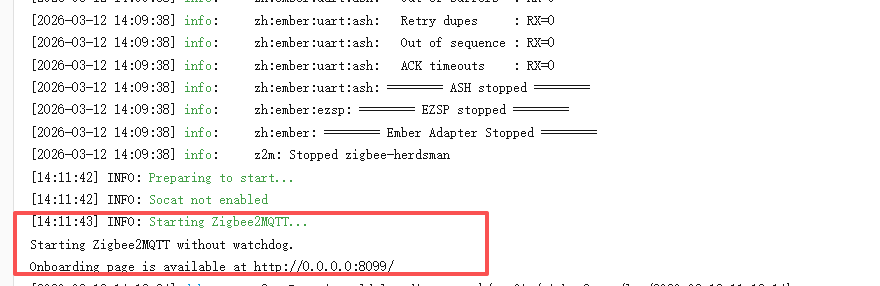
15. First-time Z2M: serial first
Configure serial first. Use the Mosquitto you already installed; you do not need a full MQTT form on first launch.
- Fill in port, baud rate, and adapter, then start Z2M
- When the log shows
Starting Zigbee2MQTT..., open the web UI - Match MQTT settings to Mosquitto, submit, and wait until Z2M finishes starting
Docs: Zigbee2MQTT getting started: onboarding · adapter basic configuration
16. Z2M web UI will not open
If configuration.yaml has:
frontend:
  enabled: false
  port: 8080
the UI never starts, and port 8080 returns Connection refused. Use:
frontend:
  enabled: true
  port: 8080
  host: 0.0.0.0
Set auth_token if you expose it on the LAN. Save and restart Zigbee2MQTT.
Docs: Zigbee2MQTT frontend: enabled / host / auth_token
17. Yes / no
| Question | Answer |
|---|---|
| Can one coordinator run ZHA and Zigbee2MQTT at once? | No. |
| Can Mosquitto and Zigbee2MQTT run together? | Yes. |
| Can two coordinators run ZHA and Z2M separately? | Yes (two independent Zigbee networks). |
| Does Ethernet on router firmware extend the Zigbee mesh? | No. |