
ETH-MG router web CLI
ETH-MG21, ETH-MG24, and ETH-MG21 POE / ETH-MG24 POE, with MG21/24 flashed as Zigbee router, join ZHA or Zigbee2MQTT as a router in the Zigbee network. You do not need a USB-serial adapter: open the device web UI, go to Settings & Tools → Logs & Debug, and send standard Silicon Labs CLI to MG21/24.
Open Logs & Debug
- In a browser, enter the
dongle.localhostname or the device IP address - In the sidebar, open Settings & Tools → Logs & Debug
- Turn on Web debug logging at the top. Router serial echo only shows in the log window when this is on
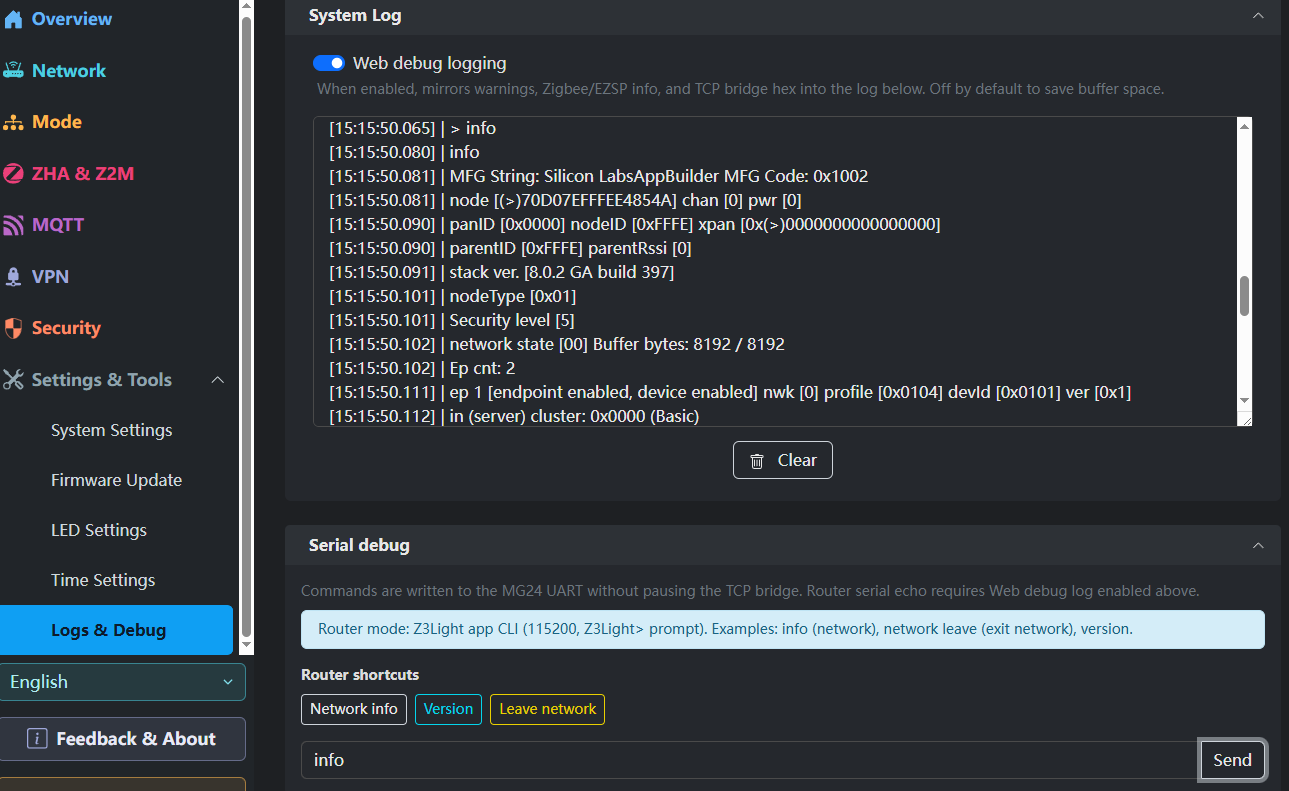
The default router firmware is a Z3Light device.
Saved shortcuts
The web UI keeps three common commands as buttons. They are standard Silicon Labs CLI:
| Button | Command | Use |
|---|---|---|
| Network info | info | Node ID, channel, power, PAN ID, stack version |
| Version | version | Firmware / stack version |
| Leave network | network leave | Make this router leave the current Zigbee network |
Use Leave network only when you need to rejoin the coordinator. Until the device has joined a network, it enables network search by default.
Type other CLI yourself
The command set is standard Silicon Labs EmberZNet CLI. Anything the shortcuts do not cover, type in the box at the bottom and click Send.
Start with info to check that channel and node ID match the coordinator. Click Clear when you are done reading.
Look up unknown commands in the Silicon Labs CLI docs first. Do not send commands that change keys or shut down the radio on a live mesh.
Notes
- This CLI cmd debug feature is only available in router mode
- If there is no echo, confirm Web debug logging is on
- Use this to check join, leave, channel, and version. You do not need debug on all the time while Home Assistant is running